运行须知:
- 关闭电脑端的防火墙(来宾或公用网络)
- 电脑与手机处于同一局域网内(开热点,或连同一个网络)
- 前端访问的ip地址为热点网络的ip地址
- 如果前端需要访问电脑虚拟机中的服务,需要在虚拟机:编辑-网络编辑器-NAT设置-端口转发 中设置主机到虚拟机的端口转发。
IM服务端-理论实现
消息通信
服务端负责转发用户消息,以及消息回执(确认应答)。
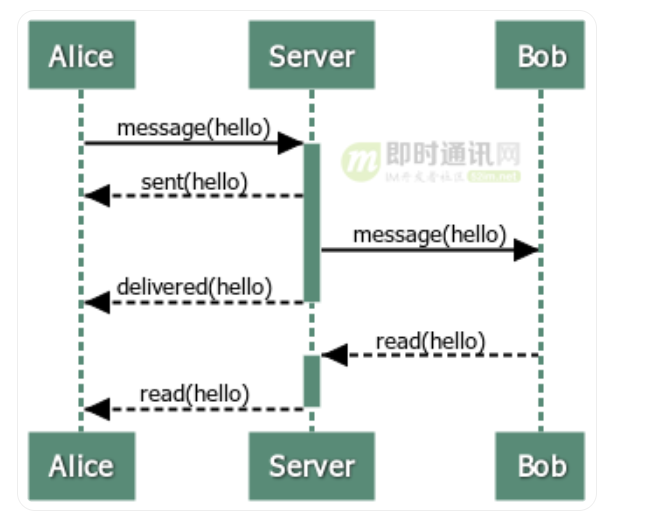
文本消息类ChatMsg:
1
2
3
4
5
6
7
| message ChatMsg{
id = 1;
fromId = Alice
destId = Bob
msgBody = hello
}
|
消息回执类AckMsg:
1
2
3
4
5
6
7
8
9
10
11
12
| message AckMsg {
id;
fromId;
destId;
msgType;
ackMsgId;
}
enum MsgType {
DELIVERED;
READ;
}
|
注: 服务器不区分ChatMsg和AckMsg,处理过程都是一样的,即解析消息的destId并进行转发。
水平拓展
管理用户状态
当用户量越来越大,必然需要增加服务器的数量,用户的连接被分散在不同的机器上。此时,就需要存储用户连接在哪台机器上。
此时引入一个模块来管理用户的连接信息,并用Redis以key-value形式存储 userID和connectorID:
1
2
3
4
5
6
7
8
9
10
11
12
13
14
15
16
17
18
| public interface UserStatusService {
String online(String userId, String connectorId);
void offline(String userId);
String getConnectorId(String userId);
}
|
消息转发
此外,还需要一个模块在不同机器上转发消息,结构如下:
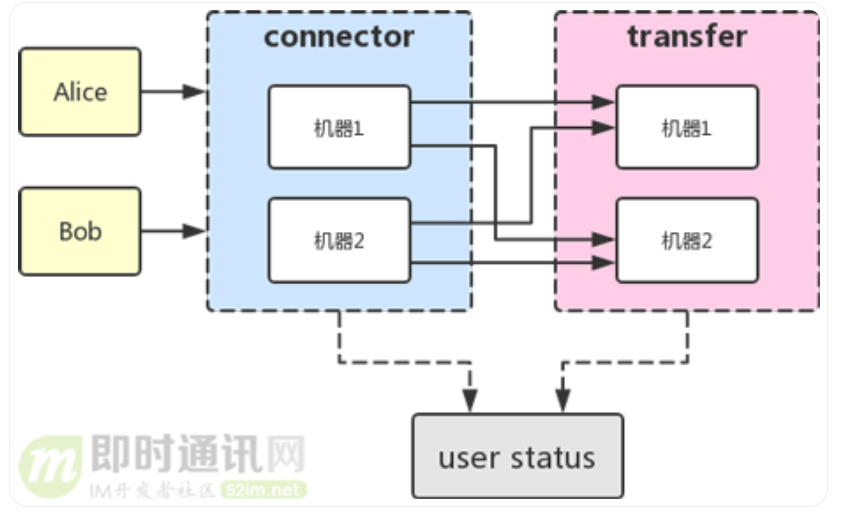
此时服务被拆分成了connector和transfer两个模块,connector模块用于维持用户的长链接,而transfer的作用是将消息在多个connector之间转发。
消息传递流程:
假设 Alice上线,连接到机器[1]上:
机器1将Alice和它的连接存入内存,调用user status的online方法记录Alice上线。
Alice 发送一条消息给 Bob:
- 机器1收到消息后,解析destId,在内存中查找是否有Bob。
- 如果没有,代表Bob未连接到这台机器,则转发给transfer。
transfer调用user status的getConnectorId(Bob) 方法找到Bob所连接的connector,返回机器[2]
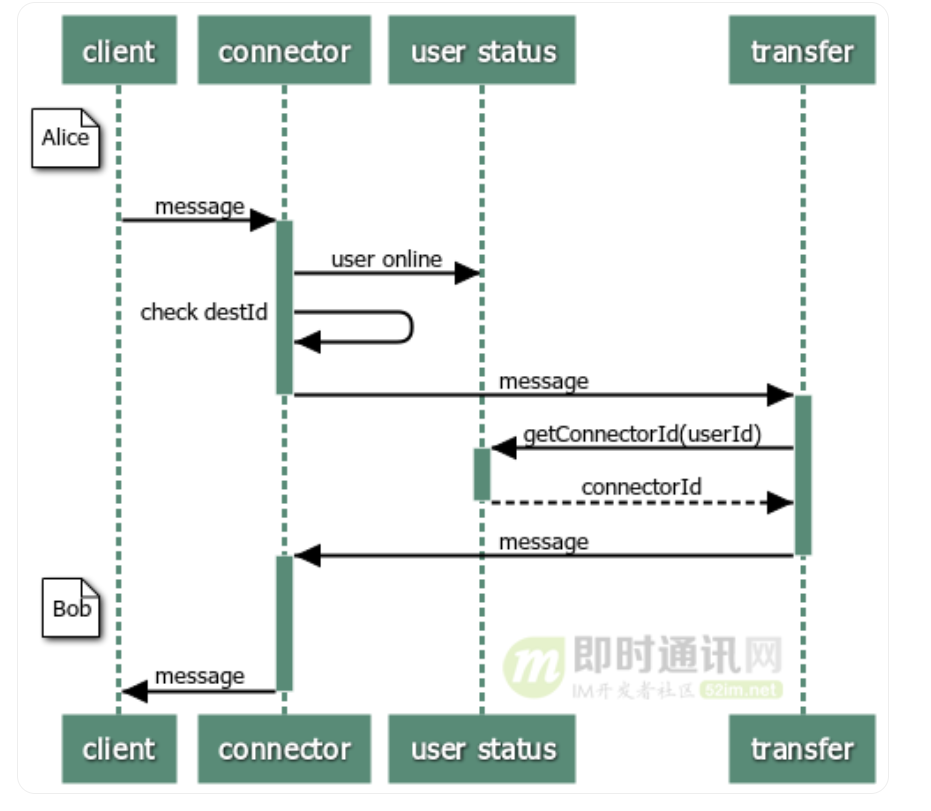
总结:
引入user status模块管理用户连接,transfer模块在不同的机器之间转发,使服务可以水平扩展。为了满足实时转发,transfer需要和每台connector机器都保持长链接。
离线消息
如果用户当前不在线,就必须把消息持久化下来,等待用户下次上线再推送,这里使用mysql存储离线消息。
为了方便地水平扩展,可以使用消息队列进行解耦:
- transfer接收到消息后如果发现用户不在线,就发送给消息队列入库;
- 用户登录时,服务器从库里拉取离线消息进行推送。
离线消息表:
1
2
3
4
5
6
7
8
9
10
| CREATE TABLE `im_offline` (
`id` int(11) COMMENT '主键',
`msg_id` bigint(20) COMMENT '消息id',
`msg_type` int(2) COMMENT '消息类型',
`content` varbinary(5000) COMMENT '消息内容',
`to_user_id` varchar(100) COMMENT '收件人id',
`has_read` tinyint(1) COMMENT '是否阅读',
`gmt_create` timestamp COMMENT '创建时间',
PRIMARY KEY (`id`)
);
|
msg_type用于区分消息类型(chat,ack),content加密后的消息内容以byte数组的形式存储。
用户上线时按照条件to_user_id=用户id拉取记录即可。
防止离线消息重复推送:
首先取出所有has_read=false的字段;
检查每条消息的has_read值是否为false,如果是,则改为true。这是原子操作。
1
| update im_offline set has_read = true where id = ${msg_id} and has_read = false
|
修改成功则推送,失败则不推送。
用户登录、好友关系等
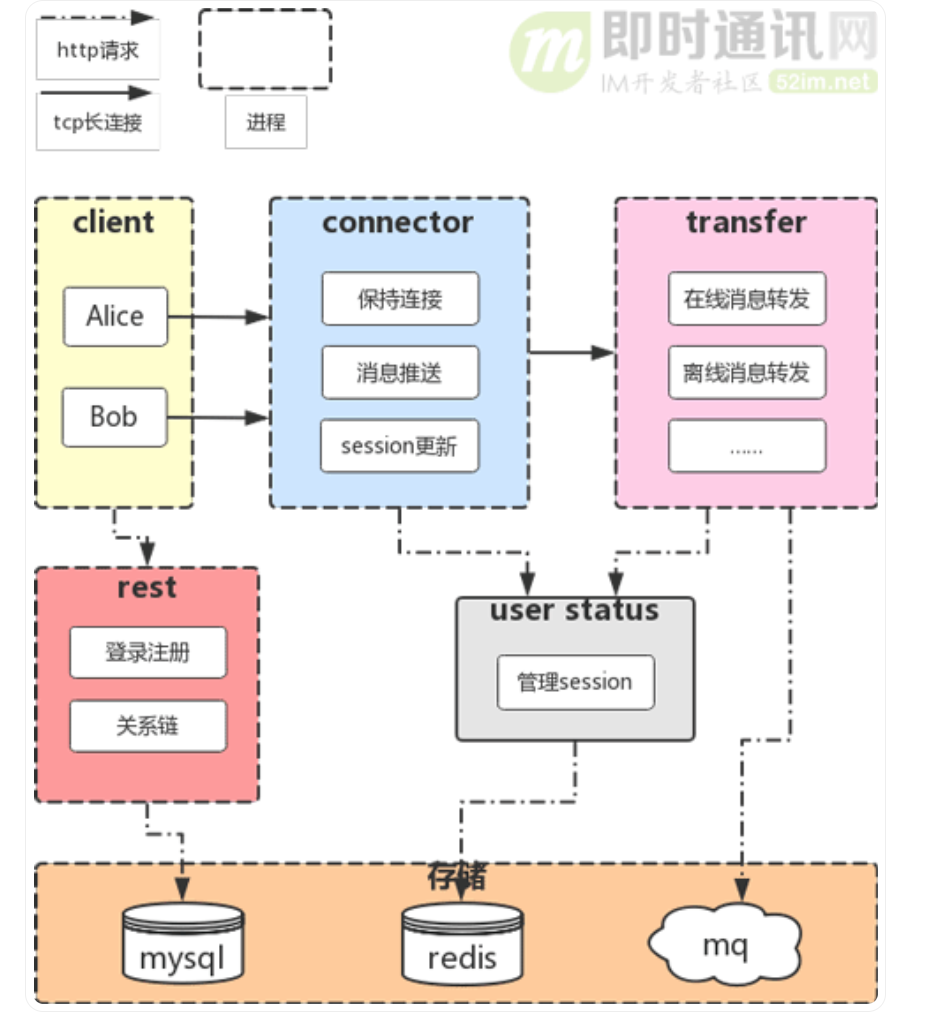
用户的注册登录、账户管理、好友关系链等功能更适合使用http协议,因此将这个模块做成一个restful服务,对外暴露http接口供客户端调用。
基本架构
至此,基本架构就完成了,如下图:
可靠性
对于IM系统来说,可靠是指 不丢消息,消息不重复,不乱序。
不丢消息: 加入ack机制,确认对方收到了消息。
具体实现可以模仿tcp协议做一个应用层的ack机制:
- tcp以字节为单位,而这里用message为单位。
- 发送方每次发送一个消息,就要等待对方的ack回应,在ack确认消息中应带有收到的 id 以便发送方识别。
- 发送方需要维护一个等待ack的队列。每次发送一个消息后,就将消息和一个计时器入队。
- 在另外一个线程一直轮询队列,如果有超时未收到ack的,就去除消息重发。
超时未收到ack的话,有两种处理:
不重复、不乱序:
有的时候因为网络原因可能导致ack收到较慢,发送方就会重复发送,那么接收方必须有一个去重机制。
去重的方式是给每个消息增加一个唯一id。这个唯一id只需要在一个会话中唯一即可,例如某两个人的会话,或者某一个群。如果网络断连了,重新连接后,就是新的会话了,id会重新从0开始。
还有一点,当客户端上线时,应该先推送完离线消息,再更新session。否则,先更新了session的话,在推送离线消息时,可能有新消息进来,导致乱序。
安全性
客户的隐私需要保护,因此所有的消息都必须加密处理。
可以将通信密钥保存在用户关系表relation中,当客户端登录时,就会从数据库中获取该用户所有的relation,存在内存中,以便后续加密解密。 当客户端给某个好友发送消息时,取出内存中该关系的密钥,加密后发送。同样,当收到一条消息时,取出相应的密钥解密。
1
2
3
4
5
6
7
8
9
10
| CREATE TABLE `im_relation` (
`id` bigint(20) COMMENT '关系id',
`user_id1` varchar(100) COMMENT '用户1id',
`user_id2` varchar(100) COMMENT '用户2id',
`encrypt_key` char(33) COMMENT 'aes密钥',
`gmt_create` timestamp DEFAULT CURRENT_TIMESTAMP,
`gmt_update` timestamp DEFAULT CURRENT_TIMESTAMP ON UPDATE CURRENT_TIMESTAMP,
PRIMARY KEY (`id`),
UNIQUE KEY `USERID1_USERID2` (`user_id1`,`user_id2`)
);
|
项目描述
- 该项目是一个即时聊天通信项目,用于和好友一对一聊天或加群群聊,以及传输文件。
技术栈: Springboot + Netty + Redis + RabbitMQ + MinIO
实现功能:
实现token方式的登录注册,避免跨域和session共享问题。
登录时返回随机UUID作为token,redis存储token 【key: login:token:token值;value:用户简略信息】, 使用拦截器对所有页面进行token持续时间刷新,
实现点对点聊天,群聊,消息未读标记,上线消息推送,好友管理,好友在线查看等功能。(netty + redis + mysql)
好友管理:
- 搜索用户
- 发送好友请求: 添加好友请求记录到数据库
- 接收好友请求: 查询数据库,有没有发给自己的好友请求
- 处理好友请求: 拒绝=直接删除数据库信息,接收=相互增加好友记录到双方数据库表
- 查询好友列表: 数据库查询即可
聊天:
有最新消息的聊天排在前面, 使用redis中SortedSet来存储会话列表(单聊群聊都一样)
key:prefix_session_list:{sessionID};聊天ID
value:{chatCount}; 聊天信息总数
score:{msgID}; 最新聊天信息ID
用户对每一个聊天的进度,未读信息数 = chatCount - readCount;
key:prefix_read:{uid}:{sessionID}; 用户所有的聊天
value:{readCount}; 已读信息总数
score:{msgID}; 已读最新聊天ID
(新入群的成员不能看到入群前的信息,可以维护一个入群时的msgID,群中大于msgID的msg才能被看到)
好友在线查看:
redis中存储用户在线信息: 【key:online_user:{uid};value:1/0】
登录上线时value置为1,退出或心跳读写都超时时置为0;
基于netty实现心跳机制,无读写时保持连线。利用RabbitMQ有序处理离线消息。
netty心跳实现: IdleStateHandler设置读写超时时间,自定义的HeartBeatHandler()执行超时处理,如关闭channel,设置用户下线状态等
上线推送:根据redis中已读的聊天信息ID和已读数,判断是否有新消息。
基于MinIO实现文件存储功能,支持断点续传。
使用minIO进行分布式存储;
断点续传: 在上传前先进行分块, 每个分块上传时标记上传中,上传完成后标记已上传。
Hello Netty服务器
- 构建一对主从线程组
- 定义服务器启动类
- 为服务器设置Channel
- 设置处理从线程池的助手类初始化器
- 监听启动和关闭服务器
HelloServer类, 搭建线程组和配置启动引导类:
1
2
3
4
5
6
7
8
9
10
11
12
13
14
15
16
17
18
19
20
21
22
23
24
25
26
|
public class HelloServer {
public static void main(String[] args) {
EventLoopGroup bossGroup = new NioEventLoopGroup(1);
EventLoopGroup workGroup = new NioEventLoopGroup(1);
ServerBootstrap serverBootstrap = new ServerBootstrap();
try {
serverBootstrap
.group(bossGroup, workGroup)
.channel(NioServerSocketChannel.class)
.childHandler(new HelloServerInitializer());
ChannelFuture future = serverBootstrap.bind(8088).sync();
future.channel().closeFuture().sync();
} catch (InterruptedException e) {
e.printStackTrace();
} finally {
bossGroup.shutdownGracefully();
workGroup.shutdownGracefully();
}
}
}
|
HelloServerInitializer类,初始化Channel:
1
2
3
4
5
6
7
8
9
10
11
12
13
|
public class HelloServerInitializer extends ChannelInitializer<SocketChannel> {
@Override
protected void initChannel(SocketChannel ch) throws Exception {
ChannelPipeline pipeline = ch.pipeline();
pipeline.addLast("HttpServerCodec", new HttpServerCodec());
pipeline.addLast("customHandler", new CustomHandler());
}
}
|
CustomHandler类,具体的Handler处理器,可以看作是拦截器:
1
2
3
4
5
6
7
8
9
10
11
12
13
14
15
16
17
18
19
20
21
22
23
24
|
public class CustomHandler extends SimpleChannelInboundHandler<HttpObject> {
@Override
protected void channelRead0(ChannelHandlerContext ctx, HttpObject msg) throws Exception {
Channel channel = ctx.channel();
System.out.println(channel.remoteAddress());
ByteBuf content = Unpooled.copiedBuffer("Hello netty!", CharsetUtil.UTF_8);
DefaultFullHttpResponse response = new DefaultFullHttpResponse(
HttpVersion.HTTP_1_1,
HttpResponseStatus.OK,
content
);
response.headers().set(HttpHeaderNames.CONTENT_TYPE, "text/plain");
response.headers().set(HttpHeaderNames.CONTENT_LENGTH, content.readableBytes());
ctx.writeAndFlush(response);
}
}
|
springboot整合netty + 通信逻辑
服务端
springboot监听器
ApplicationListener是一个事件监听、订阅的实现, 此处在根上下文处,即程序初始化时启动netty
1
2
3
4
5
6
7
8
9
10
11
12
13
14
15
16
| @Component
public class NettyBooter implements ApplicationListener<ContextRefreshedEvent> {
@Override
public void onApplicationEvent(ContextRefreshedEvent event) {
if (event.getApplicationContext().getParent() == null) {
try {
WSServer.getInstance().start();
} catch (Exception e) {
e.printStackTrace();
}
}
}
}
|
netty服务端启动类
1
2
3
4
5
6
7
8
9
10
11
12
13
14
15
16
17
18
19
20
21
22
23
24
25
26
27
28
29
30
31
32
33
34
| @Component
public class WSServer {
private static class SingletionWSServer {
static final WSServer instance = new WSServer();
}
public static WSServer getInstance() {
return SingletionWSServer.instance;
}
private EventLoopGroup mainGroup;
private EventLoopGroup subGroup;
private ServerBootstrap server;
private ChannelFuture future;
public WSServer() {
mainGroup = new NioEventLoopGroup();
subGroup = new NioEventLoopGroup();
server = new ServerBootstrap();
server.group(mainGroup, subGroup)
.channel(NioServerSocketChannel.class)
.childHandler(new WSServerInitialzer());
}
public void start() {
this.future = server.bind(8088);
System.err.println("netty websocket server 启动完毕...");
}
}
|
Channel初始化类
1
2
3
4
5
6
7
8
9
10
11
12
13
14
15
16
17
18
19
20
21
22
23
24
25
26
27
28
29
30
31
32
33
34
35
36
37
| public class WSServerInitialzer extends ChannelInitializer<SocketChannel> {
@Override
protected void initChannel(SocketChannel ch) throws Exception {
ChannelPipeline pipeline = ch.pipeline();
pipeline.addLast(new HttpServerCodec());
pipeline.addLast(new ChunkedWriteHandler());
pipeline.addLast(new HttpObjectAggregator(1024*64));
pipeline.addLast(new IdleStateHandler(8, 10, 12));
pipeline.addLast(new HeartBeatHandler());
pipeline.addLast(new WebSocketServerProtocolHandler("/ws"));
pipeline.addLast(new ChatHandler());
}
}
|
自定义的Handler
1
2
3
4
5
6
7
8
9
10
11
12
13
14
15
16
17
18
19
20
21
22
23
24
25
26
27
28
29
30
31
32
33
34
35
36
37
38
39
40
41
42
43
44
45
46
47
48
49
50
51
52
53
54
55
56
57
58
59
60
61
62
63
64
65
66
67
68
69
70
71
72
73
74
75
76
77
78
79
80
81
82
83
84
85
86
87
88
89
90
91
92
93
94
95
96
97
98
99
100
101
|
public class ChatHandler extends SimpleChannelInboundHandler<TextWebSocketFrame> {
public static ChannelGroup clients = new DefaultChannelGroup(GlobalEventExecutor.INSTANCE);
@Override
protected void channelRead0(ChannelHandlerContext ctx, TextWebSocketFrame msg) throws Exception {
String content = msg.text();
Channel currentChannel = ctx.channel();
DataContent dataContent = JsonUtils.jsonToPojo(content, DataContent.class);
Integer action = dataContent.getAction();
if (action == MsgActionEnum.CONNECT.type) {
String senderId = dataContent.getChatMsg().getSenderId();
UserChannelRel.put(senderId, currentChannel);
} else if (action == MsgActionEnum.CHAT.type) {
.....
Channel receiverChannel = UserChannelRel.get(receiverId);
if (receiverChannel == null) {
} else {
Channel findChannel = clients.find(receiverChannel.id());
if (findChannel != null) {
receiverChannel.writeAndFlush(
new TextWebSocketFrame(JsonUtils.objectToJson(dataContentMsg))
);
} else {
}
}
} else if (action == MsgActionEnum.SIGNED.type) {
UserService userService = (UserService) SpringUtil.getBean("userServiceImpl");
String msgIdsStr = dataContent.getExtand();
String msgIds[] = msgIdsStr.split(",");
List<String> msgIdList = new ArrayList<>();
for (String mid : msgIds) {
if (StringUtils.isNotBlank(mid)) {
msgIdList.add(mid);
}
}
if (!msgIdList.isEmpty()) {
userService.updateMsgSigned(msgIdList);
}
} else if (action == MsgActionEnum.KEEPALIVE.type) {
System.out.println("收到来自channel为[" + currentChannel + "]的心跳包...");
}
}
@Override
public void handlerAdded(ChannelHandlerContext ctx) throws Exception {
clients.add(ctx.channel());
}
@Override
public void handlerRemoved(ChannelHandlerContext ctx) throws Exception {
String channelId = ctx.channel().id().asShortText();
System.out.println("客户端被移除,channelId为:" + channelId);
clients.remove(ctx.channel());
}
@Override
public void exceptionCaught(ChannelHandlerContext ctx, Throwable cause) throws Exception {
cause.printStackTrace();
ctx.channel().close();
clients.remove(ctx.channel());
}
}
|
心跳机制
添加心跳相关的处理器,自定义心跳处理器
1
2
3
4
5
6
|
pipeline.addLast(new IdleStateHandler(8, 10, 12));
pipeline.addLast(new HeartBeatHandler());
|
1
2
3
4
5
6
7
8
9
10
11
12
13
14
15
16
17
18
19
20
21
22
23
24
25
26
27
28
| public class HeartBeatHandler extends ChannelInboundHandlerAdapter {
@Override
public void userEventTriggered(ChannelHandlerContext ctx, Object evt) throws Exception {
if (evt instanceof IdleStateEvent) {
IdleStateEvent event = (IdleStateEvent)evt;
if (event.state() == IdleState.READER_IDLE) {
System.out.println("进入读空闲...");
} else if (event.state() == IdleState.WRITER_IDLE) {
System.out.println("进入写空闲...");
} else if (event.state() == IdleState.ALL_IDLE) {
System.out.println("channel关闭前,users的数量为:" + ChatHandler.clients.size());
Channel channel = ctx.channel();
channel.close();
System.out.println("channel关闭后,users的数量为:" + ChatHandler.clients.size());
}
}
}
}
|
客户端
本项目客户端在前端逻辑中使用了 WebSocket协议发送消息, 所以客户端不需要再用Netty。 而服务端的netty处理器会接收一个TextWebSocketFrame,其中frame是消息的载体,它是用于为websocket专门处理文本的对象。
文件服务器
FastDFS
FastDFS是用C语言编写的分布式文件系统。 拥有冗余备份,负载均衡,线性扩容等机制,并注重高可用、高性能等指标。
组成: 客户端,Tracker Server,Storage Server
文件上传流程:
- Storange Server定时向 tracker 汇报自己的状态。
- 客户端向Tracker Server提出上传请求;
- Tracker Server 检查是否有可用的storage, 返回可用的storange给客户端;
- 客户端向指定的 Tracker Server上传文件;
- Storage Server 将文件写入,并返回文件相对路径。
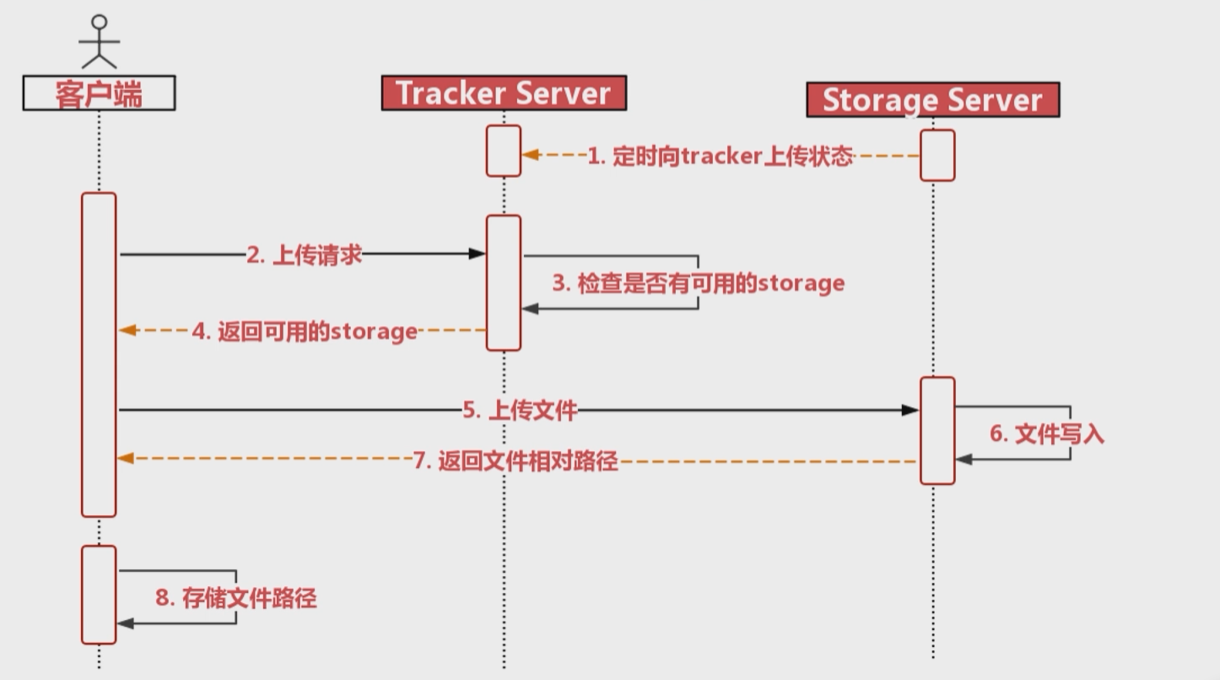
需要安装:libfastcommo ,fastdfs,fastdfs-nginx-module,nginx,
springboot整合fastDFS
依赖:
1
2
3
4
5
| <dependency>
<groupId>com.github.tobato</groupId>
<artifactId>fastdfs-client</artifactId>
<version>1.26.2</version>
</dependency>
|
将fdfs配置引入项目: @Import(FdfsClientConfig.class)
1
2
3
4
5
6
7
| @Configuration
@Import(FdfsClientConfig.class)
@EnableMBeanExport(registration = RegistrationPolicy.IGNORE_EXISTING)
public class FastdfsImporter {
}
|
在配置文件中配置:
1
2
3
4
5
6
7
8
9
10
11
12
|
fdfs:
so-timeout: 1501
connect-timeout: 601
thumb-image:
width: 80
height: 80
tracker-list:
- 192.168.205.129:22122
- 192.168.205.130:22122
|
或者properties格式:
1
2
3
4
5
| fdfs.soTimeout=1501
fdfs.connectTimeout=601
fdfs.thumbImage.width=80
fdfs.thumbImage.height=80
fdfs.trackerList[0]=192.168.1.70:22122
|
例子: 使用FastDFS的工具类
1
2
3
4
5
6
7
8
9
10
11
12
13
14
15
16
17
18
19
20
21
22
23
24
25
26
27
28
29
30
31
32
33
34
35
36
37
38
39
40
41
42
43
44
45
46
47
48
49
50
51
52
53
54
55
56
57
58
59
60
61
62
63
64
65
66
67
68
69
70
71
72
73
74
75
76
77
78
79
80
81
82
83
84
85
86
87
88
89
90
91
92
93
94
95
96
97
98
99
100
101
102
103
104
105
106
107
108
109
110
111
112
113
114
115
116
117
118
119
120
121
122
123
124
125
126
127
128
129
130
131
132
133
134
135
136
137
| import java.io.ByteArrayInputStream;
import java.io.IOException;
import java.nio.charset.Charset;
import org.apache.commons.io.FilenameUtils;
import org.apache.commons.lang3.StringUtils;
import org.springframework.beans.factory.annotation.Autowired;
import org.springframework.stereotype.Component;
import org.springframework.web.multipart.MultipartFile;
import com.github.tobato.fastdfs.domain.StorePath;
import com.github.tobato.fastdfs.exception.FdfsUnsupportStorePathException;
import com.github.tobato.fastdfs.service.FastFileStorageClient;
@Component
public class FastDFSClient {
@Autowired
private FastFileStorageClient storageClient;
public String uploadFile(MultipartFile file) throws IOException {
StorePath storePath = storageClient.uploadFile(
file.getInputStream(),
file.getSize(),
FilenameUtils.getExtension(file.getOriginalFilename()),
null);
return storePath.getPath();
}
public String uploadFile2(MultipartFile file) throws IOException {
StorePath storePath = storageClient.uploadImageAndCrtThumbImage(
file.getInputStream(),
file.getSize(),
FilenameUtils.getExtension(file.getOriginalFilename()),
null);
return storePath.getPath();
}
public String uploadQRCode(MultipartFile file) throws IOException {
StorePath storePath = storageClient.uploadFile(file.getInputStream(), file.getSize(),
"png", null);
return storePath.getPath();
}
public String uploadFace(MultipartFile file) throws IOException {
StorePath storePath = storageClient.uploadImageAndCrtThumbImage(file.getInputStream(), file.getSize(),
"png", null);
return storePath.getPath();
}
public String uploadBase64(MultipartFile file) throws IOException {
StorePath storePath = storageClient.uploadImageAndCrtThumbImage(file.getInputStream(), file.getSize(),
"png", null);
return storePath.getPath();
}
public String uploadFile(String content, String fileExtension) {
byte[] buff = content.getBytes(Charset.forName("UTF-8"));
ByteArrayInputStream stream = new ByteArrayInputStream(buff);
StorePath storePath = storageClient.uploadFile(stream, buff.length, fileExtension, null);
return storePath.getPath();
}
public void deleteFile(String fileUrl) {
if (StringUtils.isEmpty(fileUrl)) {
return;
}
try {
StorePath storePath = StorePath.praseFromUrl(fileUrl);
storageClient.deleteFile(storePath.getGroup(), storePath.getPath());
} catch (FdfsUnsupportStorePathException e) {
e.getMessage();
}
}
}
|
文件处理工具类:
1
2
3
4
5
6
7
8
9
10
11
12
13
14
15
16
17
18
19
20
21
22
23
24
25
26
27
28
29
30
31
32
33
34
35
36
37
38
39
40
41
42
43
44
45
46
47
48
49
50
51
52
53
54
55
56
57
58
59
60
61
62
63
64
65
66
67
68
69
70
71
72
73
74
75
76
77
78
79
80
81
82
83
84
85
86
87
88
89
90
91
92
93
94
95
96
97
98
99
100
101
102
103
104
105
106
107
108
109
110
111
112
113
114
115
116
117
118
119
120
121
122
123
124
125
126
127
128
129
130
131
132
133
134
135
136
137
138
139
140
141
142
143
144
145
146
147
148
149
150
151
152
153
154
155
156
| import java.io.BufferedOutputStream;
import java.io.ByteArrayOutputStream;
import java.io.File;
import java.io.FileInputStream;
import java.io.FileOutputStream;
import java.io.IOException;
import java.io.InputStream;
import java.net.HttpURLConnection;
import java.net.URL;
import org.springframework.mock.web.MockMultipartFile;
import org.springframework.stereotype.Service;
import org.springframework.util.Base64Utils;
import org.springframework.web.multipart.MultipartFile;
@Service
public class FileUtils {
public static File createFileByUrl(String url, String suffix) {
byte[] byteFile = getImageFromNetByUrl(url);
if (byteFile != null) {
File file = getFileFromBytes(byteFile, suffix);
return file;
} else {
return null;
}
}
private static byte[] getImageFromNetByUrl(String strUrl) {
try {
URL url = new URL(strUrl);
HttpURLConnection conn = (HttpURLConnection) url.openConnection();
conn.setRequestMethod("GET");
conn.setConnectTimeout(5 * 1000);
InputStream inStream = conn.getInputStream();
byte[] btImg = readInputStream(inStream);
return btImg;
} catch (Exception e) {
e.printStackTrace();
}
return null;
}
private static byte[] readInputStream(InputStream inStream) throws Exception {
ByteArrayOutputStream outStream = new ByteArrayOutputStream();
byte[] buffer = new byte[1024];
int len = 0;
while ((len = inStream.read(buffer)) != -1) {
outStream.write(buffer, 0, len);
}
inStream.close();
return outStream.toByteArray();
}
private static File getFileFromBytes(byte[] b, String suffix) {
BufferedOutputStream stream = null;
File file = null;
try {
file = File.createTempFile("pattern", "." + suffix);
System.out.println("临时文件位置:" + file.getCanonicalPath());
FileOutputStream fstream = new FileOutputStream(file);
stream = new BufferedOutputStream(fstream);
stream.write(b);
} catch (Exception e) {
e.printStackTrace();
} finally {
if (stream != null) {
try {
stream.close();
} catch (IOException e) {
e.printStackTrace();
}
}
}
return file;
}
public static MultipartFile createImg(String url) {
try {
File file = FileUtils.createFileByUrl(url, "jpg");
FileInputStream inputStream = new FileInputStream(file);
MultipartFile multipartFile = new MockMultipartFile(file.getName(), inputStream);
return multipartFile;
} catch (IOException e) {
e.printStackTrace();
return null;
}
}
public static MultipartFile fileToMultipart(String filePath) {
try {
File file = new File(filePath);
FileInputStream inputStream = new FileInputStream(file);
MultipartFile multipartFile = new MockMultipartFile(file.getName(), "png", "image/png", inputStream);
return multipartFile;
} catch (IOException e) {
e.printStackTrace();
return null;
}
}
public static void main(String[] args) {
}
public static boolean base64ToFile(String filePath, String base64Data) throws Exception {
String dataPrix = "";
String data = "";
if(base64Data == null || "".equals(base64Data)){
return false;
}else{
String [] d = base64Data.split("base64,");
if(d != null && d.length == 2){
dataPrix = d[0];
data = d[1];
}else{
return false;
}
}
byte[] bs = Base64Utils.decodeFromString(data);
org.apache.commons.io.FileUtils.writeByteArrayToFile(new File(filePath), bs);
return true;
}
}
|
MinIO
MinIO 适合存储大容量非结构化的数据,例如图片,视频,日志文件,备份数据和容器/虚拟机镜像等。
MinIO集群采用去中心化共享架构,每个节点是对等关系,通过Nginx可对MinIO进行负载均衡访问。
- MinIO的去中心化和分布式,可以用于搭建一个高可用的对象存储服务: MinIO将分布在不同服务器上的多块硬盘组成一个对象存储服务。由于硬盘分布在不同的节点上,分布式MinIO避免了单点故障。
- MinIO使用纠删码技术来保护数据。 纠删码是一种恢复丢失和损坏数据的数学算法, 它将数据分块冗余地分散在各个节点的磁盘上,所有可用磁盘组成一个集合,当上传一个文件时会通过纠删码算法计算 ,将文件进行分成n块,还会生成n个校验码,分散存储在n个硬盘上。 如果丢失了一半以下数量的硬盘,仍然可以恢复数据,不过在恢复重构时需要消耗CPU资源且有延时。 (类似 abc 分成了 ab,bc,ac,损失一半以下仍能恢复)
使用docker启动:
spirngboot整合MinIO
minio管理界面Buckets里你要用的bucket的Manage里的 Access Policy改为public。(访问策略改为public)
添加依赖:
1
2
3
4
5
6
7
8
9
10
11
12
13
14
15
16
17
18
|
<dependency>
<groupId>com.squareup.okhttp3</groupId>
<artifactId>okhttp</artifactId>
<version>4.9.0</version>
</dependency>
<dependency>
<groupId>io.minio</groupId>
<artifactId>minio</artifactId>
<version>8.4.2</version>
<exclusions>
<exclusion>
<artifactId>okhttp</artifactId>
<groupId>com.squareup.okhttp3</groupId>
</exclusion>
</exclusions>
</dependency>
|
使用测试
1
2
3
4
5
6
7
8
9
10
11
12
13
14
15
16
17
18
19
20
21
22
23
24
25
26
27
28
29
30
31
32
33
34
35
36
37
38
39
40
41
42
43
44
45
46
47
48
49
50
51
52
53
54
55
56
57
58
59
60
61
62
63
64
65
66
67
68
69
70
71
72
73
74
75
76
77
78
79
80
81
82
83
84
85
86
87
88
89
90
91
92
93
94
95
96
97
98
99
100
101
102
103
104
105
106
107
108
109
110
111
112
113
114
115
116
117
118
| import com.j256.simplemagic.ContentInfo;
import com.j256.simplemagic.ContentInfoUtil;
import io.minio.*;
import org.apache.commons.codec.digest.DigestUtils;
import org.apache.commons.io.IOUtils;
import org.junit.jupiter.api.Test;
import org.springframework.boot.test.context.SpringBootTest;
import org.springframework.http.MediaType;
import java.io.File;
import java.io.FileInputStream;
import java.io.FileOutputStream;
import java.io.FilterInputStream;
@SpringBootTest
class MinioTestApplicationTests {
static MinioClient minioClient = MinioClient.builder()
.endpoint("http://192.168.205.129:9000")
.credentials("minioadmin", "minioadmin")
.build();
@Test
public void upload() throws Exception {
ContentInfo extensionMatch = ContentInfoUtil.findExtensionMatch(".mp4");
String mimeType = MediaType.APPLICATION_OCTET_STREAM_VALUE;
if (extensionMatch != null) {
mimeType = extensionMatch.getMimeType();
}
UploadObjectArgs uploadObjectArgs = UploadObjectArgs.builder()
.bucket("testbucket1")
.filename("D:/Download/edge/wallhaven-2em38y_2560x1440.png")
.object("test-1.png")
.contentType(mimeType)
.build();
minioClient.uploadObject(uploadObjectArgs);
System.out.println("success");
}
@Test
public void query() throws Exception{
String path = minioClient.getPresignedObjectUrl(
GetPresignedObjectUrlArgs.builder()
.bucket(bucketName)
.object("aa/test-1.png")
.method(Method.GET)
.expiry(5, TimeUnit.DAYS)
.build()
);
System.out.println(path);
}
@Test
public void delete() throws Exception {
RemoveObjectArgs removeObjectArgs = RemoveObjectArgs.builder()
.bucket("testbucket1")
.object("test-1.png")
.build();
minioClient.removeObject(removeObjectArgs);
}
@Test
public void deleteFile(String fileUrl) {
if (StringUtils.isEmpty(fileUrl)) {
return;
}
try {
URL url = new URL(fileUrl);
String pathStr = url.getPath();
String filePath = Paths.get(pathStr).toString().substring(bucket_medisfiles.length() + 1);
minioClient.removeObject(RemoveObjectArgs.builder()
.bucket(bucket_medisfiles)
.object(filePath)
.build()
);
} catch (Exception e) {
e.printStackTrace();
}
}
@Test
public void getFile() {
GetObjectArgs fileObject = GetObjectArgs.builder()
.bucket("testbucket1")
.object("test-1.png")
.build();
try (FilterInputStream filterInputStream = minioClient.getObject(fileObject);
FileOutputStream outputStream = new FileOutputStream(new File("D:/Desktop/Workspace/_project/test/file/wallhaven-2em38y_2560x1440.png"));
) {
IOUtils.copy(filterInputStream, outputStream);
FileInputStream fileInputStream1 = new FileInputStream(new File("D:/Download/edge/wallhaven-2em38y_2560x1440.png"));
String source_md5 = DigestUtils.md5Hex(fileInputStream1);
FileInputStream fileInputStream = new FileInputStream(new File("D:/Desktop/Workspace/_project/test/file/wallhaven-2em38y_2560x1440.png"));
String local_md5 = DigestUtils.md5Hex(fileInputStream);
if (source_md5.equals(local_md5)) {
System.out.println("下载成功");
}else {
System.out.println("校验失败");
}
} catch (Exception e) {
e.printStackTrace();
}
}
}
|
断点续传
分块文件和合并文件:
对于大文件传输,分块可以在中断传输后,不必重传一整个大文件。
在本地进行文件的分块和合并练习:
1
2
3
4
5
6
7
8
9
10
11
12
13
14
15
16
17
18
19
20
21
22
23
24
25
26
27
28
29
30
31
32
33
34
35
36
37
38
39
40
41
42
43
44
45
46
47
48
49
50
51
52
53
54
55
56
57
58
59
60
61
62
63
64
65
66
67
68
69
70
71
72
73
74
75
76
77
78
79
80
81
82
83
84
85
86
87
88
89
90
91
92
93
94
95
96
97
98
99
100
101
102
103
104
105
106
107
108
109
110
111
112
113
| import org.apache.commons.codec.digest.DigestUtils;
import org.junit.jupiter.api.Test;
import java.io.File;
import java.io.FileInputStream;
import java.io.IOException;
import java.io.RandomAccessFile;
import java.util.Arrays;
import java.util.Collections;
import java.util.Comparator;
import java.util.List;
public class BigFileTest {
@Test
public void testChunk() throws IOException {
File sourceFile = new File("d:/develop/bigfile_test/nacos.mp4");
String chunkPath = "d:/develop/bigfile_test/chunk/";
File chunkFolder = new File(chunkPath);
if (!chunkFolder.exists()) {
chunkFolder.mkdirs();
}
long chunkSize = 1024 * 1024 * 1;
long chunkNum = (long) Math.ceil(sourceFile.length() * 1.0 / chunkSize);
System.out.println("分块总数:" + chunkNum);
byte[] b = new byte[1024];
RandomAccessFile raf_read = new RandomAccessFile(sourceFile, "r");
for (int i = 0; i < chunkNum; i++) {
File file = new File(chunkPath + i);
if (file.exists()) {
file.delete();
}
boolean newFile = file.createNewFile();
if (newFile) {
RandomAccessFile raf_write = new RandomAccessFile(file, "rw");
int len = -1;
while ((len = raf_read.read(b)) != -1) {
raf_write.write(b, 0, len);
if (file.length() >= chunkSize) {
break;
}
}
raf_write.close();
System.out.println("完成分块" + i);
}
}
raf_read.close();
}
@Test
public void testMerge() throws IOException {
File chunkFolder = new File("d:/develop/bigfile_test/chunk/");
File originalFile = new File("d:/develop/bigfile_test/nacos.mp4");
File mergeFile = new File("d:/develop/bigfile_test/nacos01.mp4");
if (mergeFile.exists()) {
mergeFile.delete();
}
mergeFile.createNewFile();
RandomAccessFile raf_write = new RandomAccessFile(mergeFile, "rw");
raf_write.seek(0);
byte[] b = new byte[1024];
File[] fileArray = chunkFolder.listFiles();
List<File> fileList = Arrays.asList(fileArray);
Collections.sort(fileList, Comparator.comparingInt(o -> Integer.parseInt(o.getName())));
for (File chunkFile : fileList) {
RandomAccessFile raf_read = new RandomAccessFile(chunkFile, "rw");
int len = -1;
while ((len = raf_read.read(b)) != -1) {
raf_write.write(b, 0, len);
}
raf_read.close();
}
raf_write.close();
try (
FileInputStream fileInputStream = new FileInputStream(originalFile);
FileInputStream mergeFileStream = new FileInputStream(mergeFile);
) {
String originalMd5 = DigestUtils.md5Hex(fileInputStream);
String mergeFileMd5 = DigestUtils.md5Hex(mergeFileStream);
if (originalMd5.equals(mergeFileMd5)) {
System.out.println("合并文件成功");
} else {
System.out.println("合并文件失败");
}
}
}
}
|
实际应用
前端对文件分块的大小为5MB,SpringBoot web默认上传文件的大小限制为1MB,这里需要在media-api工程修改配置如下:
1
2
3
4
5
| spring:
servlet:
multipart:
max-file-size: 50MB
max-request-size: 50MB
|
max-file-size:单个文件的大小限制
Max-request-size: 单次请求的大小限制
流程:
前端对文件进行分块。
前端上传分块文件前请求媒资服务检查文件是否存在,如果已经存在则不再上传。
如果分块文件不存在则前端开始上传。
后端服务将分块文件上传至MinIO。
前端将分块上传完毕后,会请求后端合并分块。
后端判断分块上传完成则请求MinIO合并文件。
合并完成,校验合并后的文件是否完整,如果不完整则删除文件。
具体代码:
BigFilesController类:
1
2
3
4
5
6
7
8
9
10
11
12
13
14
15
16
17
18
19
20
21
22
23
24
25
26
27
28
29
30
31
32
33
34
35
36
37
38
39
40
41
42
43
44
45
46
47
48
49
50
51
52
| @Api(value = "大文件上传接口", tags = "大文件上传接口")
@RestController
public class BigFilesController {
@Autowired
MediaFileService mediaFileService;
@ApiOperation(value = "文件上传前检查文件")
@PostMapping("/upload/checkfile")
public RestResponse<Boolean> checkfile(@RequestParam("fileMd5") String fileMd5) throws Exception {
return mediaFileService.checkFile(fileMd5);
}
@ApiOperation(value = "分块文件上传前的检测")
@PostMapping("/upload/checkchunk")
public RestResponse<Boolean> checkchunk(@RequestParam("fileMd5") String fileMd5, @RequestParam("chunk") int chunk) throws Exception {
return mediaFileService.checkChunk(fileMd5, chunk);
}
@ApiOperation(value = "上传分块文件")
@PostMapping("/upload/uploadchunk")
public RestResponse uploadchunk(@RequestParam("file") MultipartFile file,
@RequestParam("fileMd5") String fileMd5,
@RequestParam("chunk") int chunk) throws Exception {
File tempFile = File.createTempFile("minio", ".temp");
file.transferTo(tempFile);
String localFilePath = tempFile.getAbsolutePath();
return mediaFileService.uploadChunk(fileMd5, chunk, localFilePath);
}
@ApiOperation(value = "合并文件")
@PostMapping("/upload/mergechunks")
public RestResponse mergechunks(@RequestParam("fileMd5") String fileMd5,
@RequestParam("fileName") String fileName,
@RequestParam("chunkTotal") int chunkTotal) throws Exception {
Long companyId = 1232141425L;
UploadFileParamsDto uploadFileParamsDto = new UploadFileParamsDto();
uploadFileParamsDto.setFilename(fileName);
uploadFileParamsDto.setTags("视频文件");
uploadFileParamsDto.setFileType("001002");
return mediaFileService.mergechunks(1232141425L, fileMd5, chunkTotal, uploadFileParamsDto);
}
}
|
MediaFileServiceImpl类:
1
2
3
4
5
6
7
8
9
10
11
12
13
14
15
16
17
18
19
20
21
22
23
24
25
26
27
28
29
30
31
32
33
34
35
36
37
38
39
40
41
42
43
44
45
46
47
48
49
50
51
52
53
54
55
56
57
58
59
60
61
62
63
64
65
66
67
68
69
70
71
72
73
74
75
76
77
78
79
80
81
82
83
84
85
86
87
88
89
90
91
92
93
94
95
96
97
98
99
100
101
102
103
104
105
106
107
108
109
110
111
112
113
114
115
116
117
118
119
120
121
122
123
124
125
126
127
128
129
130
131
132
133
134
135
136
137
138
139
140
141
142
143
144
145
146
147
148
149
150
151
152
153
154
155
156
157
158
159
160
161
162
163
164
165
166
167
168
169
170
171
172
173
174
175
176
177
178
179
180
181
182
183
184
185
186
187
188
189
190
191
192
193
194
195
196
197
198
199
200
201
202
203
204
205
206
207
208
209
210
211
212
213
214
215
216
217
218
219
220
221
222
223
224
225
226
227
228
229
230
231
232
233
234
235
236
237
238
239
240
241
242
243
244
245
246
247
248
249
250
251
252
253
254
255
256
257
258
259
260
261
262
263
264
265
266
267
268
269
270
271
272
273
274
275
276
277
278
279
280
281
282
283
284
285
286
| @Slf4j
@Service
public class MediaFileServiceImpl implements MediaFileService {
@Autowired
MediaFilesMapper mediaFilesMapper;
@Autowired
MinioClient minioClient;
@Autowired
MediaFileService currentProxy;
@Value("${minio.bucket.videofiles}")
private String bucket_video;
private String getMimeType(String extension) {
if (extension == null) {
extension = "";
}
ContentInfo extensionMatch = ContentInfoUtil.findExtensionMatch(extension);
String mimeType = MediaType.APPLICATION_OCTET_STREAM_VALUE;
if (extensionMatch != null) {
mimeType = extensionMatch.getMimeType();
}
return mimeType;
}
public boolean addMediaFilesToMinIO(String localFilePath, String mimeType, String bucket, String objectName) {
try {
UploadObjectArgs uploadObjectArgs = UploadObjectArgs.builder()
.bucket(bucket)
.filename(localFilePath)
.object(objectName)
.contentType(mimeType)
.build();
minioClient.uploadObject(uploadObjectArgs);
log.debug("上传文件到minio成功,bucket:{},objectName:{},错误信息:{}", bucket, objectName);
return true;
} catch (Exception e) {
e.printStackTrace();
log.error("上传文件出错,bucket:{},objectName:{},错误信息:{}", bucket, objectName, e.getMessage());
}
return false;
}
@Transactional
public MediaFiles addMediaFilesToDb(Long companyId, String fileMd5, UploadFileParamsDto uploadFileParamsDto, String bucket, String objectName) {
MediaFiles mediaFiles = mediaFilesMapper.selectById(fileMd5);
if (mediaFiles == null) {
mediaFiles = new MediaFiles();
BeanUtils.copyProperties(uploadFileParamsDto, mediaFiles);
mediaFiles.setId(fileMd5);
mediaFiles.setCompanyId(companyId);
mediaFiles.setBucket(bucket);
mediaFiles.setFilePath(objectName);
mediaFiles.setFileId(fileMd5);
mediaFiles.setUrl("/" + bucket + "/" + objectName);
mediaFiles.setCreateDate(LocalDateTime.now());
mediaFiles.setStatus("1");
mediaFiles.setAuditStatus("002003");
int insert = mediaFilesMapper.insert(mediaFiles);
if (insert <= 0) {
log.debug("向数据库保存文件失败,bucket:{},objectName:{}", bucket, objectName);
return null;
}
return mediaFiles;
}
return mediaFiles;
}
@Override
public RestResponse<Boolean> checkChunk(String fileMd5, int chunkIndex) {
String chunkFileFolderPath = getChunkFileFolderPath(fileMd5);
GetObjectArgs getObjectArgs = GetObjectArgs.builder()
.bucket(bucket_video)
.object(chunkFileFolderPath + chunkIndex)
.build();
try {
FilterInputStream inputStream = minioClient.getObject(getObjectArgs);
if (inputStream != null) {
return RestResponse.success(true);
}
} catch (Exception e) {
e.printStackTrace();
}
return RestResponse.success(false);
}
@Override
public RestResponse uploadChunk(String fileMd5, int chunk, String localChunkFilePath) {
String chunkFilePath = getChunkFileFolderPath(fileMd5) + chunk;
String mimeType = getMimeType(null);
boolean b = addMediaFilesToMinIO(localChunkFilePath, mimeType, bucket_video, chunkFilePath);
if (!b) {
return RestResponse.validfail(false, "上传分块文件失败");
}
return RestResponse.success(true);
}
@Override
public RestResponse mergechunks(Long companyId, String fileMd5, int chunkTotal, UploadFileParamsDto uploadFileParamsDto) {
String chunkFileFolderPath = getChunkFileFolderPath(fileMd5);
List<ComposeSource> sources =
Stream.iterate(0, i -> ++i).limit(chunkTotal)
.map(i -> ComposeSource.builder().bucket(bucket_video).object(chunkFileFolderPath + i).build())
.collect(Collectors.toList());
String filename = uploadFileParamsDto.getFilename();
String extension = filename.substring(filename.lastIndexOf("."));
String objectName = getFilePathByMd5(fileMd5, extension);
ComposeObjectArgs composeObjectArgs = ComposeObjectArgs.builder()
.bucket(bucket_video)
.object(objectName)
.sources(sources)
.build();
try {
minioClient.composeObject(composeObjectArgs);
} catch (Exception e) {
e.printStackTrace();
log.error("合并文件出错,bucket:{},objectName:{},错误信息:{}", bucket_video, objectName, e.getMessage());
return RestResponse.validfail(false, "合并文件异常");
}
File file = downloadFileFromMinIO(bucket_video, objectName);
try (FileInputStream fileInputStream = new FileInputStream(file)) {
String mergeFile_md5 = DigestUtils.md5Hex(fileInputStream);
if (!fileMd5.equals(mergeFile_md5)) {
log.error("校验合并文件md5值不一致,原始文件:{},合并文件:{}", fileMd5, mergeFile_md5);
return RestResponse.validfail(false, "文件校验失败");
}
uploadFileParamsDto.setFileSize(file.length());
} catch (Exception e) {
return RestResponse.validfail(false, "文件校验失败");
}
MediaFiles mediaFiles = currentProxy.addMediaFilesToDb(companyId, fileMd5, uploadFileParamsDto, bucket_video, objectName);
if (mediaFiles == null) {
return RestResponse.validfail(false, "文件入库失败");
}
clearChunkFiles(chunkFileFolderPath, chunkTotal);
return RestResponse.success(true);
}
private void clearChunkFiles(String chunkFileFolderPath, int chunkTotal) {
Iterable<DeleteObject> objects =
Stream.iterate(0, i -> ++i).limit(chunkTotal)
.map(i -> new DeleteObject(chunkFileFolderPath + i)).collect(Collectors.toList());
RemoveObjectsArgs removeObjectsArgs = RemoveObjectsArgs.builder().bucket(bucket_video).objects(objects).build();
Iterable<Result<DeleteError>> results = minioClient.removeObjects(removeObjectsArgs);
results.forEach(f -> {
try {
DeleteError deleteError = f.get();
} catch (Exception e) {
e.printStackTrace();
}
});
}
public File downloadFileFromMinIO(String bucket, String objectName) {
File minioFile = null;
FileOutputStream outputStream = null;
try {
InputStream stream = minioClient.getObject(GetObjectArgs.builder()
.bucket(bucket)
.object(objectName)
.build());
minioFile = File.createTempFile("minio", ".merge");
outputStream = new FileOutputStream(minioFile);
IOUtils.copy(stream, outputStream);
return minioFile;
} catch (Exception e) {
e.printStackTrace();
} finally {
if (outputStream != null) {
try {
outputStream.close();
} catch (IOException e) {
e.printStackTrace();
}
}
}
return null;
}
private String getFilePathByMd5(String fileMd5, String fileExt) {
return fileMd5.substring(0, 1) + "/" + fileMd5.substring(1, 2) + "/" + fileMd5 + "/" + fileMd5 + fileExt;
}
private String getChunkFileFolderPath(String fileMd5) {
return fileMd5.substring(0, 1) + "/" + fileMd5.substring(1, 2) + "/" + fileMd5 + "/" + "chunk" + "/";
}
}
|
用户登录注册
Session实现
session的工作原理:
- 打开浏览器,在浏览器上发送首次请求
- 服务器会创建一个HttpSession对象,该对象代表一次会话
- 同时生成HttpSession对象对应的Cookie对象,并且Cookie对象的name是jsessionid,Cookie的value是32位长度的字符串(jsessionid=xxxx)
- 服务器将Cookie的value和HttpSession对象绑定到session列表中
- 服务器将Cookie完整发送给浏览器客户端
- 浏览器客户端将Cookie保存到缓存中
- 当再次发送请求的时候,会自动提交缓存中当的Cookie
- 服务器接收到Cookie,验证该Cookie的name是否是jsessionid,然后获取该Cookie的value
- 通过Cookie的value去session列表中检索对应的HttpSession对象
基于Session的登录:
- 发送验证码
- 校验手机号是否合法,不合法重新输入,合法就生成验证码;
- 将验证码保存到session;
- 发送验证码;
- 登录、注册
- 用户提交手机号和验证码,后台从session中拿到当前验证码,进行校验,不一致则返回;
- 如果一致,则后台根据手机号查询用户,如果用户不存在,则为用户创建账号,保存到数据库。
- 保存用户信息到session中,方便后续获得登录信息。
- 验证登录状态(再次访问,无需登录)
- 用户发起请求并携带cookie, 后台从session中获取用户信息;
- 判断用户是否存在,如果没有session信息,则进行拦截,
- 如果有session信息,则将用户信息保存到threadLocal中,并且放行。
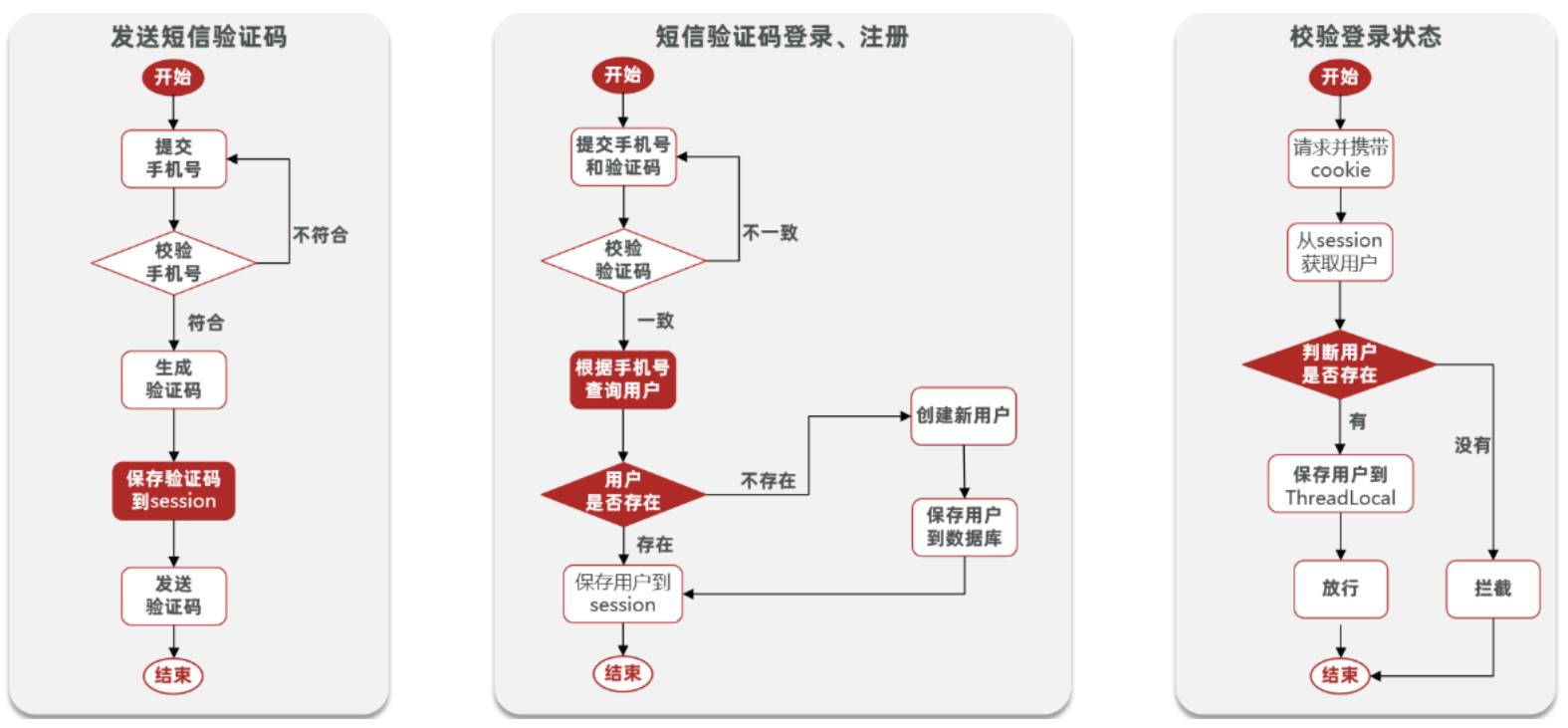
代码:
发送验证码
1
2
3
4
5
6
7
8
9
10
11
12
13
14
15
16
17
| @Override
public Result sendCode(String phone, HttpSession session) {
if (RegexUtils.isPhoneInvalid(phone)) {
return Result.fail("手机号格式错误!");
}
String code = RandomUtil.randomNumbers(6);
session.setAttribute("code",code);
log.debug("发送短信验证码成功,验证码:{}", code);
return Result.ok();
}
|
登录注册
1
2
3
4
5
6
7
8
9
10
11
12
13
14
15
16
17
18
19
20
21
22
23
24
25
26
27
28
| @Override
public Result login(LoginFormDTO loginForm, HttpSession session) {
String phone = loginForm.getPhone();
if (RegexUtils.isPhoneInvalid(phone)) {
return Result.fail("手机号格式错误!");
}
Object cacheCode = session.getAttribute("code");
String code = loginForm.getCode();
if(cacheCode == null || !cacheCode.toString().equals(code)){
return Result.fail("验证码错误");
}
User user = query().eq("phone", phone).one();
if(user == null){
user = createUserWithPhone(phone);
}
session.setAttribute("user", BeanUtils.copyProperties(user,UserDTO.class));
return Result.ok();
}
|
验证登录状态(再次访问,无需登录)
拦截器:
1
2
3
4
5
6
7
8
9
10
11
12
13
14
15
16
17
18
19
20
| public class LoginInterceptor implements HandlerInterceptor {
@Override
public boolean preHandle(HttpServletRequest request, HttpServletResponse response, Object handler) throws Exception {
HttpSession session = request.getSession();
Object user = session.getAttribute("user");
if(user == null){
response.setStatus(401);
return false;
}
UserHolder.saveUser((UserDTO)user);
return true;
}
}
|
ThreadLocal工具类,保存线程私有变量:
1
2
3
4
5
6
7
8
9
10
11
12
13
14
15
| public class UserHolder {
private static final ThreadLocal<UserDTO> tl = new ThreadLocal<>();
public static void saveUser(UserDTO user){
tl.set(user);
}
public static UserDTO getUser(){
return tl.get();
}
public static void removeUser(){
tl.remove();
}
}
|
配置拦截器:
1
2
3
4
5
6
7
8
9
10
11
12
13
14
15
16
17
18
19
20
21
22
23
| @Configuration
public class MvcConfig implements WebMvcConfigurer {
@Resource
private StringRedisTemplate stringRedisTemplate;
@Override
public void addInterceptors(InterceptorRegistry registry) {
registry.addInterceptor(new LoginInterceptor())
.excludePathPatterns(
"/shop/**",
"/voucher/**",
"/shop-type/**",
"/upload/**",
"/blog/hot",
"/user/code",
"/user/login"
).order(1);
registry.addInterceptor(new RefreshTokenInterceptor(stringRedisTemplate)).addPathPatterns("/**").order(0);
}
}
|
session共享问题:
一般服务器会以集群的形式存在,即每次访问不一定是访问同一台服务器,当seesion信息只保存在上次登录的服务器中,所以访问到其他服务器时就会被拦截。
早期的解决方案是session拷贝,就是说虽然每个tomcat服务器上都有不同的session,但是每当任意一台服务器的session修改时,都会同步给其他的Tomcat服务器的session,这样的话,就可以实现session的共享了。
- 缺点: 每台服务器都有完整的一份session数据,服务器压力过大。session拷贝数据时,可能会出现延迟
现在的解决方案:redis数据本身就是共享的,使用redis来完成信息保存。
Redis实现
session实现方案中,session保存了验证码和用户信息, 同样的,Redis也保存这些信息,key-value形式如下:
| key |
value |
| phone:手机号 |
验证码 |
| token:xxxxx |
用户信息 |